
Venue - Relaxing Design Games
SuperbloomSimulation
4.62.82K Reviews
- Version
- 1.29.0
- Installs
- 1.00M
- Age Rating
- Everyone
Screenshots

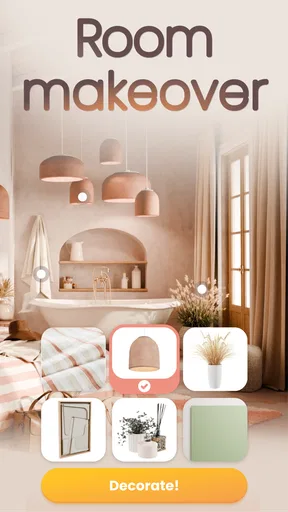
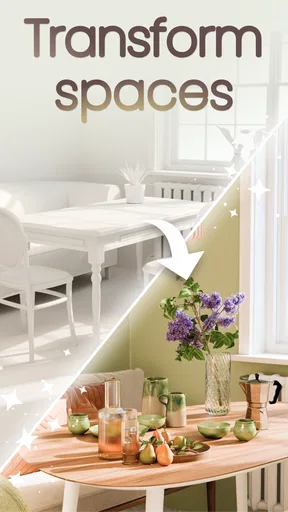




Our Review of Venue - Relaxing Design Games
 Analysis by Appyee
I tend to enjoy design games most when they let me experiment without turning every choice into a test, and Venue is built around that kind of low-pressure creativity. It’s a free simulation game from Superbloom, rated for Everyone, where I can work through room-design ideas at my own pace. The appeal is less about learning professional interior-design rules and more about trying combinations, seeing how a space feels, and changing direction when an idea doesn’t land.
Where Venue Stands Today
The current release is version 1.22.0, and the game has reached more than a million installs. Its average rating is 4.6 from around 97,000 ratings, which suggests a sizable audience for its relaxed approach to designing rooms. I’d treat that response as a useful sign of broad appeal, not a promise that every player will enjoy the same parts of the game: people who want open-ended decoration may find more to love than players who need a tightly defined building challenge.
Venue’s central loop is easy to understand: explore a space, make design choices, and see the room take shape. That simplicity makes it well suited to short sessions. I can open it when I have a few spare minutes, test a color or furniture combination, and stop without needing to remember a complicated sequence of tasks. The trade-off is that anyone looking for deep architectural tools or a detailed simulation of real renovation work may find the experience deliberately light.
What the Release History Tells Me
The game was released on September 1, 2024, and its current version shows that it has continued to receive updates since launch. That is a concrete sign of ongoing development, although a version number by itself doesn’t tell me which features changed or how any particular update altered play. I wouldn’t assume that a recent release automatically means a specific new tool, room type, or improvement.
For someone deciding whether to install it now, that distinction matters. The version number tells you which build to look for, while the experience is best judged by what you want from a design game today. I’d approach Venue as an active, evolving title rather than buying into promises about future additions. If a particular feature is essential to you, check the current game itself before planning around it.
How It Fits into an Everyday Routine
A realistic use for Venue is a quick creative break after work or school. I might open it while waiting for dinner, spend a short session trying to make a room feel calmer, and leave once I’ve found a layout or palette I like. That makes it a better fit for relaxed experimentation than for a long, uninterrupted project. It can also be a handy way to collect visual ideas when I’m thinking about changing a room at home, as long as I treat the game as inspiration rather than a precise planning tool.
One useful habit is to decide on a mood before choosing individual items. If I’m aiming for a warm, quiet space, I can judge each choice by whether it supports that feeling instead of filling the room with every attractive option. A second is to make one noticeable change at a time—such as adjusting the lighting after settling on a basic palette—so it’s easier to tell what improved the overall look. This small, deliberate approach makes experimentation feel more purposeful and helps prevent a room from becoming a collection of unrelated ideas.
Venue is also a reasonable pick for younger players who enjoy visual play, thanks to its Everyone age rating, though I’d still make purchase decisions together if a child is playing. The game is free to download, but it offers in-app purchases ranging from $0.99 to $179.99 per item. That broad range is worth keeping in mind: a free starting point does not mean every optional purchase will feel small, so I’d set expectations before handing over a device or payment method.
Getting Started with Venue
First things first, setting up Venue - Interior Design Games is a breeze. After a quick download and installation, you’re greeted with a sleek and intuitive interface. There’s a brief tutorial that’s super helpful in getting you acquainted with the basic controls and features. Trust me, you’ll find yourself navigating like a pro in no time.
One of the coolest things is the variety of rooms you can design. From cozy living rooms to chic bedrooms, the app offers a plethora of spaces for you to transform. Each room presents you with a different challenge, making sure things never get boring. It’s like having the keys to a mansion where every room is a blank canvas.
Designing Your Dream Space
This is where things get really exciting! The app boasts an impressive catalog of furniture and decor items. You can mix and match styles, colors, and textures to create your dream space. The level of detail is mind-blowing, allowing you to tweak everything from the sofa fabric to the wall art. If you’ve ever wanted to experiment with bold design choices without the commitment, this is your chance.
Another aspect I absolutely love is the ability to play around with lighting. It’s amazing how much a room’s ambiance can change with just a few clicks. Whether you’re going for a warm, cozy vibe or something more modern and sleek, the lighting options in Venue make it easy to achieve.
The Social Element
What’s a game these days without a little social interaction, right? Venue has a fantastic community feature where you can share your designs and get feedback from other users. It’s like having a virtual design club where you can exchange tips and ideas with fellow enthusiasts. Plus, it’s always nice to get a little validation from others who appreciate your style.
The app also runs regular design challenges, which are a great way to test your skills and creativity. Participating in these challenges is not only fun but can also earn you some nifty rewards to expand your design options even further.
Performance and User Experience
As for performance, I found the app to be pretty smooth sailing. There were no noticeable lags or crashes during my time with it, which is always a bonus. The graphics are vibrant and detailed, really bringing your designs to life. Whether you’re using a high-end device or something more modest, Venue manages to deliver a consistent experience.
The user interface is intuitive and easy to navigate. Even if you’re a newbie to design games, you’ll find yourself quickly getting the hang of things. The app does a great job of balancing complexity with user-friendliness, making it accessible to all levels of design enthusiasts.
Choosing It Over Other Design Games
Compared with the usual alternatives in the simulation category, Venue’s strongest draw is the emphasis on decorating rooms rather than managing a large virtual world or building a detailed structure from the ground up. If what I want is a straightforward way to play with interiors, that focus is a plus: I can spend my attention on color, furnishings, and atmosphere instead of learning a broad set of systems first.
On the other hand, players who want precise floor plans, measurements, or a realistic renovation workflow should look for a dedicated home-planning tool. Venue is a game, not a substitute for measuring a real room or checking whether an actual sofa will fit through a doorway. Likewise, if I’m after a story-driven game with a strong narrative or a competitive strategy challenge, a room-design title may not hold my attention for long.
For players who enjoy sharing visual work, the community and challenges add a reason to return beyond decorating alone. I’d use those parts for inspiration, while keeping my own taste in charge: feedback can suggest a fresh direction, but a popular design isn’t automatically the one I like best. A practical approach is to finish a room in a way that satisfies me first, then share it or try a challenge when I’m ready for an outside prompt.
Where the Friction Can Show Up
The main limitation is the same quality that makes Venue approachable: it keeps the experience centered on creative play. Someone expecting a deep design editor may want more control than a mobile game is built to provide. Room challenges can also be less appealing to players who prefer to create with no prompt at all, while purely freeform decorators may miss having a clear goal to work toward. Which side matters more depends on whether you like structure as a starting point or see it as a restriction.
Optional spending is another point to handle thoughtfully. The game costs nothing to begin, but purchases are available, so I wouldn’t treat the free download as evidence that every part of the experience is free of spending decisions. If I were setting it up for a child, I’d review purchase settings first and agree on boundaries. For my own play, I’d focus on what I can enjoy without buying anything and consider an extra purchase only if it clearly adds something I want.
Device compatibility is worth checking before installing: Venue requires Android 9 or later. That makes the minimum operating-system requirement a simple first check if you’re using an older Android phone or tablet. The game is rated Everyone, but age suitability and spending suitability are different questions; the purchase range is a reason for parents to stay involved even when the content rating is broad.
Who I’d Recommend It To
I’d recommend Venue to anyone who likes rearranging rooms for fun, enjoys choosing colors and decorative details, or wants a visual activity that doesn’t demand a long session. It may also suit someone collecting loose inspiration for a real room, provided they understand that a game’s visual choices aren’t a replacement for dimensions, budgets, or practical planning. The best results come when I treat each room as a small design experiment rather than a test of whether I know the “right” style.
I’d skip it if I wanted professional-grade interior-planning tools, complete control over construction, or a game built around complex progression and strategy. I’d also think twice if I’m easily pulled into optional purchases or strongly prefer solitary play, since social sharing is part of the experience described for Venue. Those aren’t flaws for every player; they’re useful signs that the game’s particular balance may not suit everyone.
Final Thoughts
All in all, Venue - Interior Design Games is a fantastic way to indulge your interior design fantasies. It’s not just about creating beautiful spaces; it’s about exploring your creativity and having fun while doing it. Whether you’re looking for a relaxing pastime or a way to sharpen your design skills, this app has got something for everyone.
So, if you’re ready to dive into a world of color, style, and endless possibilities, go ahead and give Venue a try. Who knows, you might just discover your inner designer in the process!
What I’d Keep in Mind Before Playing
If you’re wondering whether you need design experience, I don’t think you do: the controls and visual focus make it approachable as a casual game. The more useful question is whether you enjoy making aesthetic choices for their own sake. If you do, the rooms give you a clear place to start; if you need a score, a story, or a practical design output every time you play, the appeal may be narrower.
I’d also keep expectations grounded around progression. The current version is 1.22.0, but that number alone doesn’t explain how the game’s content or systems have evolved. What I can reasonably say is that Venue has moved beyond its September 1, 2024 release and remains available as a maintained title. For existing players, that is encouraging context, not proof that any particular change has improved their favorite part of the game.
When deciding whether to return, I’d ask myself what I want from the next session: a quick color experiment, a room challenge, or a chance to share a finished design. That simple choice helps the game feel fresh without turning casual play into a checklist. If I’m not in the mood to decorate, I can leave it for another day; Venue works best when the invitation to create feels relaxing rather than obligatory.
Verdict
Strengths of Venue - Relaxing Design Games
- Realistic graphics enhance user experience.
- Variety of design styles to explore.
- Regular updates with new challenges.
- User-friendly interface for easy navigation.
- Interactive community for sharing designs.
Limitations of Venue - Relaxing Design Games
- In-app purchases can get expensive.
- Requires a stable internet connection.
- Limited offline functionality.
- Some features locked behind paywalls.
- Occasional bugs affect gameplay.
Similar Picks in This Category
View All
Truckers of Europe 3
Wanda Software4.3

Town Building Life Simulator
XGame Global4.2

Fidget Toys Trading・Pop It 3D
Freeplay Inc4.7

Sculpt People
CrazyLabs LTD4.4

Scary Teacher 3D
Z & K Games4.2

Hair Tattoo: Barber Shop Game
CASUAL AZUR GAMES4.3
Frequently Asked Questions
What is Venue - Interior Design Games all about?
Venue - Interior Design Games is an engaging app that allows users to unleash their creativity by designing and decorating virtual interiors. The game offers a variety of styles, furniture, and decor pieces to choose from, catering to users who love home design and want to experiment with different aesthetics.
Is Venue - Interior Design Games free to play?
Yes, Venue - Interior Design Games is free to download and play. However, it offers in-app purchases for additional features, items, and customization options. While it’s possible to enjoy the game without spending money, these purchases can enhance the gameplay experience significantly.
What devices are compatible with Venue - Interior Design Games?
Venue - Interior Design Games is available on both Android and iOS platforms. It requires iOS 11.0 or later for Apple devices and Android 5.0 or later for Android devices. Ensure your device is updated to the latest version for optimal performance and compatibility.
Does Venue - Interior Design Games require an internet connection?
The game primarily requires an internet connection to download new content, participate in challenges, and sync progress across devices. However, some basic design features may be accessible offline, allowing limited play without an active connection.
Are there any community features in Venue - Interior Design Games?
Yes, Venue - Interior Design Games includes community features where players can share their designs and compete in challenges. Users can vote on each other's creations, providing a social element that encourages interaction and feedback within the game's vibrant community.
Play our best games!


